
Writesonic has tools for making content just like other companies, but it doesn’t stand out much from them. Still, it’s fast and simple to use. It offers lots of content types you can use. If you work in marketing or own a small business, it’s worth trying Writesonic. It gives you many content options, each unique in how it sounds and looks.

Welcome back to our review of AI content creators!
This time, we’re checking out Writesonic. It’s a big deal in the world of AI tools for making content.
But does being popular mean it’s really worth using?
We’re going to explore these things:
- What Writesonic is Good At
- Using Writesonic Well
- Kinds of Content
- Cost
- Main Features
- Pros and Cons
- Other Choices
- Netus Checks
- Final Thoughts
Writesonic Fast Overview
- Easy to Use: 9 out of 10
- Cool Features: 7 out of 10
- Help from Support: 8 out of 10
- Cost: 6 out of 10
- Quickness: 7 out of 10
Who should use Writesonic?
Small Businesses
Small businesses can get a lot of good from using Writesonic. This is because you can make lots of different kinds of content there.
For instance, you can write social media posts to show off what you’re selling, come up with product descriptions that make your items look great, and make ads or website page text that convince people to buy things.
Marketing Teams
Big marketing groups could really like using Writesonic. It helps them save a lot of time by making it quick to create new ads.
This way, they don’t need to spend hours in a meeting room looking at an empty board. Instead, they can make content fast and then spend more time making sure it matches how the brand talks and other important parts of the project.
Solo Entrepreneurs
People working alone can really use Writesonic to help out. It lets you make content fast. Sure, it might not always sound just right, but it saves you a lot of time and money. Then, you can use what you save to take care of other big parts of your work.
Using Writesonic Well
Like any tool that writes with AI, how well it works depends a lot on what you start with.
If you give it something boring and vague, don’t hope for much. But, if you share lots of specifics, like deep details about your company and key things to mention, you’ll likely get something good to begin with.
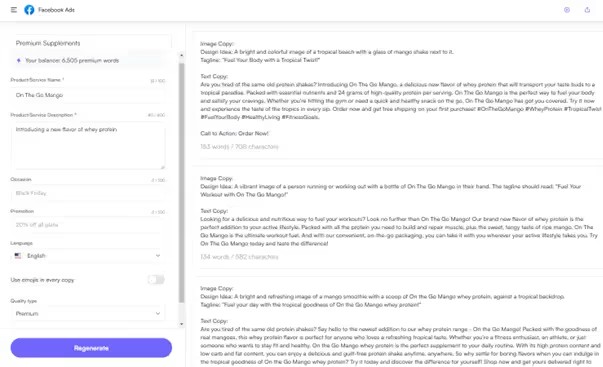
Let’s try an example. Picture you’re the boss of a supplement company that’s done really well this past year.
Now, you’re introducing a new flavor of your whey protein, called “On the Go Mango.”
I spent a lot of time thinking of that bad name.
You need to describe the product well but also talk up the new taste. This way, you can get new people interested through ads on Facebook.
First, let’s check out a not-so-good example.
Plain start? Plain finish.
Yes, the words aren’t incorrect. Yet, they don’t make me want to go for it. Do they do that for you?
Let’s give it another go, this time with lots more details.
It’s not completely neat yet, but it’s a good place to begin. It has lots of energy and creativity.
What Kind of Stuff Can Writesonic Make?
General Copy
Writesonic includes its own version of ChatGPT, named Botsonic. With it, you can chat just like you would with ChatGPT. You can also teach it about your needs and information to make it answer your questions quicker every time.
You can upload files or share them with your website. This helps the tool understand your brand better and offer you more personalized help.
Marketing Content
Writersonic gives you many ways to make your marketing stuff look good and work well.
You can make all kinds of marketing things like:
- Articles
- Landing page headlines
- Product Descriptions
- Google Ads
- Facebook Ads
- LinkedIn Ads
- App and SMS Notifications
Social Media Content
Writesonic now has a special part just for making stuff for social media. Instead of wasting time trying to figure out cool, grabby ways to share your message, Writesonic can quickly do this for you. But, it can’t make posts for Instagram, Facebook, or LinkedIn, which is a bit frustrating.
- YouTube Descriptions
- Twitter Posts
- TikTok Video Scripts
What’s the Price?
Writesonic has a Pro subscription. You can change it to fit what you need. Let’s look at how you can adjust it.
For $13 every month, you get:
- Up to 100,000 words
- One person can use it
- Access to Chat GPT-4
- Use of Botsonic
- It can write articles that are true and tailored just for you
- Works with Surfer
- You get quick help and special access
For $33 every month, you get:
- All the features of the $13 plan
- Up to 300,000 words
- Accounts for 5 people
For $66 every month, you get:
- All the features of the $33 plan
- Up to 600,000 words
- Access for 5 people
For $333 every month, you get:
- Everything that comes with the $66 plan
- You can use up to 3,000,000 words
- It’s available for 12 people
For $1749 every month, you get:
- Everything in the $1049 package
- Offers up to 15,000,000 words
- Allows 20 users
Main Features
Ads and Marketing Tools
In the ads and marketing section, you can choose from seven different options.
- Facebook Ads
- LinkedIn Ads
- Google Ad Descriptions
- Apps and SMS Notifications
- LinkedIn Ad Descriptions
- LinkedIn Ad Headlines
Imagine you own a company that makes oat milk. For March, you want to give your customers a special treat, so you’re offering them 30% off all orders.
This is a deal too good for anyone to miss!
You can start by making a Facebook Ad that will catch the attention of your followers.
When you like what you wrote, click the button to see examples of Facebook Ad content. Just like that.
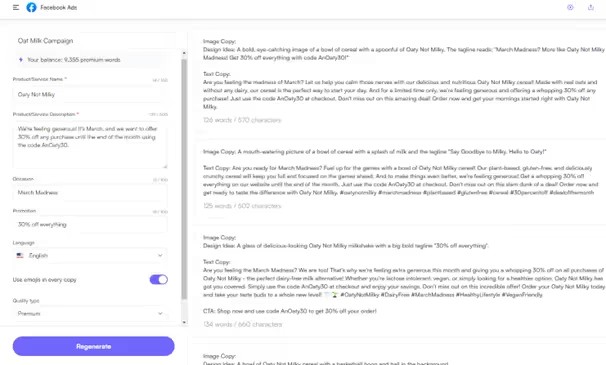
We have many choices now. They need some changes, but it will be quick.
Facebook isn’t the only spot to talk about this amazing offer. That’s when using the Ads and Marketing tool is a good idea.
If you use the same words in the LinkedIn Ad choice, it will create content that’s better for LinkedIn – it’ll have fewer emojis and a more serious way of talking.
E-commerce
You’ve gotten the word out about your amazing Oat Milk deal, and now more people are coming in steadily.
What should they see on your website next?
The E-commerce feature in Writesonic is here to help you. With it, you can make descriptions and content just for Amazon, especially if that’s where you sell a lot of your products.
Let’s start making a product description.
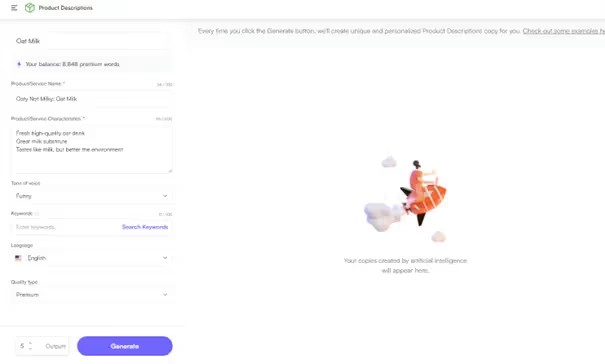
We’ve got all the key details right here. Since the thing we’re talking about is named “Oaty Not Milky,” I thought it’d be fun to make it sound more humorous. Let’s see how that turns out.
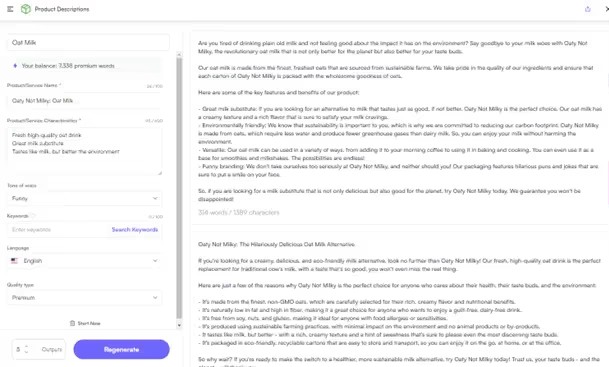
Alright, this description might not be super new or super funny (I mean, when are brands that call themselves funny actually funny, right?). But, it’s a really good starting point for anyone who’s running low on time. It’s a big time-saver. With just a little bit of tweaking and adding your own personal touches, it can quickly turn into an awesome product description that only takes a few minutes to make.
Social Media
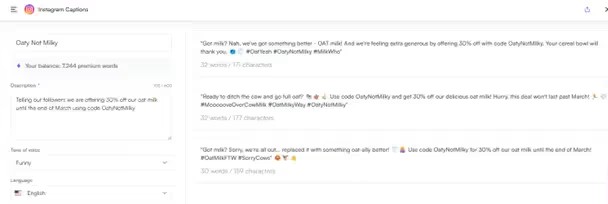
Let’s talk about giving a discount to people who already like your stuff. Offering 30% off is a smart plan for bringing in new people. But, don’t forget about your current fans and buyers. They would love this deal too! If you leave them out, they might feel upset.
Writesonic helps you make special posts for places like Instagram and Facebook.
- YouTube Scripts and Headlines
- TikTok Video Scripts
Let’s make a fun and cool Instagram post for this ad.
Website Copy
Writesonic has a neat tool for making website headlines.
We’ll stick with our oat milk topic to make it easy to follow (By the time we finish this, it’ll feel like we’ve created a new brand).
Once more, we have a good place to begin.
Benefits:
- Many kinds of content options
- Chances to train the AI to understand your brand better and provide improved answers
- Access to Chat GPT-4 for top-quality writing
- A helpful support team for customers
The Downsides:
- Not much SEO help
- Costs a lot each month for what you get, especially when you look at others
Other Choices
There are options like Hypotenuse.ai or Anyword.ai that cost about the same. If you need an AI for creating images, you should check out MidJourney.
It’s the top choice for making pictures. Want a free choice instead of Writesonic?
ChatGPT might work. However, it might not write things just the way you want for your brand.
Can BypassEngine Spot Writesonic?
Just like other AI tools, Bypass Engine can easily spot Writesonic. Remember how we described our Oaty Not Milky product?
Putting your own twist on the things you create matters a lot. It not only keeps you away from AI detectors and spam alerts but also connects better with people who read your stuff.
Writesonic: What’s the Big Deal?
To sum it up, Writesonic might not bring fresh wonders, but it sure offers lots of ways to make content and gives you many choices to get a first draft close to your wishes.
It’s always important to adjust what it makes so it sounds like your brand and feels like a human wrote it.
Signing up for the free trial is simple and quick, and you don’t have to give any credit card info. So, I suggest everyone try this tool themselves before buying it.
You start with 10,000 words, but be careful; they run out fast unless you cut down on how many options you ask for, which is a useful trick.
Catch you in the next one.
FAQs about Writesonic
What is Writesonic?
Writesonic is a tool that helps you create content. You tell it what you need, pick a style, and it makes the content in the way you want.
Can you use Writesonic without paying?
Yes, Writesonic lets you try it out for free. They give you a 10,000-word trial to see if you like it and if it suits your needs.
Why might someone choose AI to help write content?
Even though AI can’t take the place of top-notch writing, it’s a great option for people who don’t have a lot of money to spend. It’s faster than typing everything yourself and provides a good starting point that you can adjust and improve until it sounds just right.