
TextCortex is one of the best and easiest AI tools for making content quickly. You can move around easily on the website, and the best part is, you can keep using it for free every month, not just for a short trial. Yes, it doesn’t let you do everything, but when most others give you only a little bit for free, TextCortex’s offer is nice and strong. Still, it doesn’t have some big features like making headlines, outlines, or helping with prompts that other tools have. Also, it only lets you make short pieces of content, so writing longer stuff is hard. But, it’s really good for small businesses or people working by themselves. There’s a lot to like about it.

Looking for a strong AI helper to boost your work speed? TextCortex says it can help by creating content fast without cutting corners on quality.
But, is it effective, or will you find yourself using a lot of time to get your prompts right and tweaking what it makes?
We’re going to explore a few things:
- What is TextCortex really good at
- How to use it well
- What content you can make
- What the price of this tool is
- Key parts
- The good and bad sides
- Different Choices Besides TextCortex
- Does BypassEngine spot the content
- The last word on TextCortex
Quick Look at TextCortex
- Easy to use – 9 out of 10
- Good features – 7 out of 10
- Helpful customer service – 7 out of 10
- Great price – 9 out of 10
- Fast speed – 8 out of 10
- Bypass Engine can notice
Who Should Use TextCortex?
Have you ever given TextCortex a whirl? After just a brief spin, it’s clear as day that this tool is tailored for small marketing teams, business owners, or individuals flying solo.
The core aim of the tool is to speed up the content creation process for various platforms. The great part is that it allows users like you and me to dedicate more time to other crucial aspects of our work.
If coming up with innovative marketing ideas sounds like an uphill task or if transforming your brilliant thoughts into captivating content feels challenging; then let me tell you – this tool will become your best ally! It’s specially designed to help forge engaging connections between you and your audience at ease.
How to Make TextCortex Work Well
Let’s get the most out of TextCortex.
The key is loading it up with information. If your prompts are vague or too brief, you won’t get the exciting output you want. So take a moment to create comprehensive and clear prompts; this ensures that what TextCortex generates aligns with your needs.
Remember, TextCortex isn’t designed to generate titles, plan outlines or improve on prompts – don’t skip these steps. Instead, complement it with ChatGPT for those tasks initially.
Once we have everything ready from ChatGPT, we can feed it into TextCortex for some high-quality output.
Let’s consider a simple scenario:
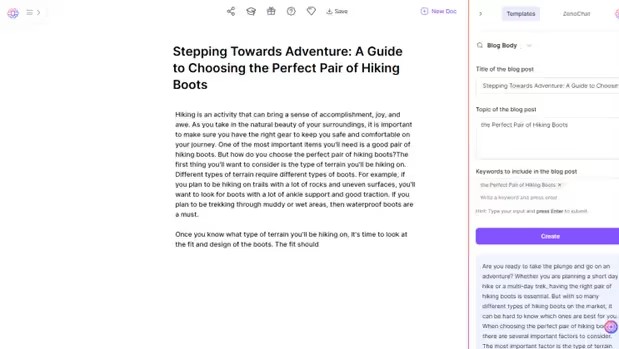
We’re writing an article about top-rated hiking boots. We insert our topic and details into TextCortex – bear in mind though, it requires us to provide a title first. assistance in coming up with an enticing title!

If we don’t like this title, we can add more details or change what’s there.
But for now, it’s okay. Let’s use this title and put it into TextCortex.
We can move the content to the editor and start working on it from there.
What Can You Make with TextCortex?
With TextCortex, you can use a bunch of tools to create stuff. But, to get to many of them, you need to pay.
Blogs
TextCortex helps you make blog posts using keywords you choose. But if you’re using a free account, you can only write up to 200 words. This makes it hard to write full articles for your business.
Also, you can’t add more to your writing, which makes TextCortex not as good as other similar tools.
Product Descriptions
The TextCortex tool helps you write about your products. But, you can’t use it with the free plan.
YouTube Captions
There’s also a tool for making captions for your YouTube videos, matching them to your video titles. But, this tool isn’t part of the free plan.
Instagram Descriptions
You can make Instagram posts with TextCortex. It helps you write stuff just for your social pages. But, you can’t use this tool for free.
Email Body Copy
Email marketing is really important for lots of companies. TextCortex helps by letting people make their own emails. But, you can’t use this tool without paying for a subscription.
Outreach Emails
TextCortex is a great help for people who need to send out a lot of cold emails, saving them a lot of time. But, keep in mind, you can’t use this feature with the free version.
What’s the Price?
for free
- Make up to 10 things
- Talk with ZenoChat
- Emails writers
Pro Plan: Pay $24.99 every month.
- Get endless creations
- Make pieces up to 200 words long.
- Use tools to summarize
- Change the tone
For Business: Pay $79.99 every month.
- Make as much as you want
- Write up to 300 words at once
- Change up to 1900 words at once
- Choose from over 80 writing styles
- Talk with ZenoChat
- Create endless, unique AI personas
Main Points
Personalization
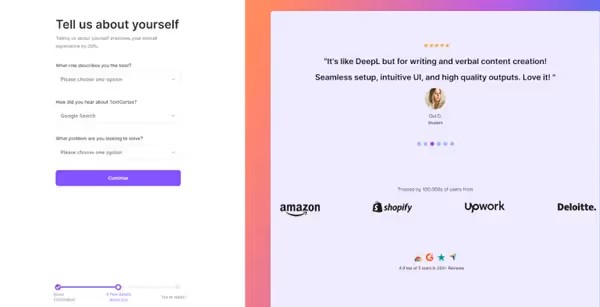
TextCortex has a great feature right from the start: it makes a tool just for you. When you set up your account, they ask you a bunch of questions. This helps them make a tool that’s exactly right for what you need.
Adding this personal touch is something you might see in other tools, but not all of them have it, which makes it really special.
Knowledge Bases
TextCortex has a cool section called the Knowledge Bases tab. You can add things called “knowledge connectors” here. They help you teach your tool the way you want it to sound.
Got lots of stuff on your website already? Or thinking of a competitor you’d like to mimic? This tool is great for making your journey unique.
Individual Personas
TextCortex lets you make your own personas. This makes TextCortex better at giving you AI help and making stuff that fits your style.
If you have a free account, you get one avatar. If you want more, you have to get a Pro or Business account.
Looking for Other Options than TextCortex
TextCortex is a great tool when it comes to AI-assisted writing for your business ads. However, remember there’s plenty of fish in the sea.
Want some alternatives? Absolutely! There are other programs that could be equally good help. Some might even save you a penny or two and add more fun to your working process.
Why not give AI SEO, Hypotenuse.ai, or Scalenut a try? They all pack features similar to TextCortex. Are you someone who whips up amazing content without much help needed? If so, ChatGPT could be just the thing for you! It’s an AI writing tool as well but the catch is – it’s free!
And yes, it draws from the same information pool like all its counterparts do! The key here with tools like these lies in how you feed them prompts.
The better your prompts―like those detailed ones used by TextCortex―the better would be your result−easy!
Now if text creation isn’t what you need and visual content catches your fancy instead – ahem Midjourney can sort that out right away! Currently one of the top choices out there when it comes down to generating images.
Can Bypass Engine spot TextCortex’s work?
Let’s use the example of perfect hiking boots and check if BypassEngine knows the content comes from AI.
Even though the text was only 160 words long, a program called BypassEngine figured out it was made by AI right away.
This shows us that it’s really important to mix the quickness of making content with AI and good writing skills.
TextCortex: What’s the Deal?
So, TextCortex is this cool place on the internet where you can find a bunch of tools to play with.
Sadly, you’ve gotta pay to get your hands on most of them. If you’re running a small business, though, they seem like they’d be super helpful. There’s a bit of a bummer, though.
The site’s missing some key stuff that others have. Things like making outlines, helping your website get found on Google, and writing big articles are nowhere to be found.
For now, until TextCortex lets you whip up long articles and blogs, it’s kinda blending in with all the other marketing tools out there.
Questions People Often Ask About TextCortex
What is TextCortex for?
TextCortex helps you quickly make content for your website, social media, blog, ads, and more.
Does TextCortex cost money?
You can use TextCortex without paying for a little while. After that, you need to pay to keep using it.
Why should we use AI to write?
AI writing saves time and effort. It makes your writing better and more interesting, and does it all quickly.