
Longshot AI might cost less but doesn’t do as much as pricey tools like Frase or SurferSEO. But, it’s not really fair to compare them since those cost a lot more. When you look at other AI tools that cost about the same, Longshot AI actually has a lot of good features.
Is it a long shot or a sure thing?
We’re here again to review another tool for creating content with AI. This time, we’re looking at Longshot AI. This tool is known for making SEO better and generating text.
We’ll take a close look at this tool, checking out each feature they offer and comparing those features to what the top companies in the industry have.
We’re going to check out the following points:
- What Longshot AI does best
- Tips for using it well
- Kinds of content it makes
- The price of this tool
- Main features
- Good and bad points
- Other options besides Longshot AI
- Final thoughts on Longshot AI
Quick Look at Longshot AI
- Easy to use – 8 out of 10
- What it can do – 7 out of 10
- Help from the company – 8 out of 10
- Cost – really good, 9 out of 10
- How fast it is – 6 out of 10
Who Should Use Longshot AI?
Longshot AI is a fantastic starting point if you’re just getting into AI-created content. It’s affordable too!
It’s great for managers in eCommerce or Affiliate Marketing who need to make a lot of content but don’t have many resources.
Sure, there are pricier AI tools out there that might do a bit more, but Longshot AI is excellent for those eager to discover what AI can do.
Using Longshot AI the Right Way
Longshot AI is super easy to use. It has a simple dashboard that helps you quickly find what you need to make any content.
To really benefit from Longshot AI, watch the tutorial videos right after you log in. Remember, the more details you give in your prompt, the better your results will be.
What kinds of writing can Longshot AI help you make?
With Longshot AI, you can make a bunch of different writings, especially for advertising.
Other AI things for the same money might let you make pictures and writings, but Longshot AI is all about making writings.
You can use it to make blog writings that are good for SEO, descriptions of products, and more things important for advertising through content.
Even though it doesn’t have a special thing for making emails or posts for social media, you can still make those easily with something called FactGPT.
For blogs, you can be happy to know there are many kinds of writings you can make with it, like steps to do something or lists. Here’s an example we made about fluffy socks.
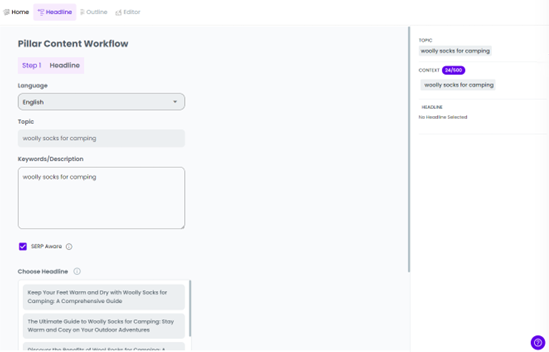
First, we picked our main idea and important words. Then, Longshot AI gave us some cool titles to pick from.
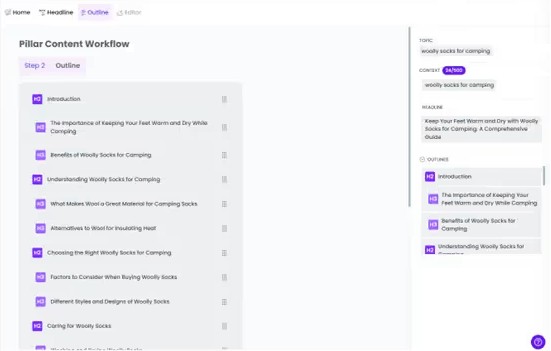
After choosing it, Longshot AI gave us an easy guide to use. We liked that, so we pressed submit to go ahead.
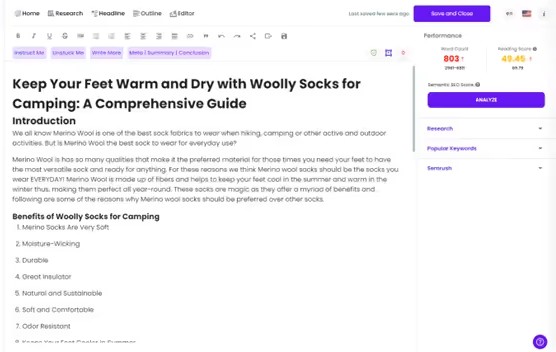
This picture shows that the created content is really organized. Like all content made by AI, you need to mix in a bit of human flair to fit your brand. But, it’s a good place to begin.
What’s the Price?
For $19 every month, you get
- 2,000 credits to use
- Just for one person
- Access to advanced AI
- No limit on projects and documents
Team Plan: Pay $49 Each Month
- Get everything the Pro plan offers
- Use up to 10,000 credits every month
- Up to five people can use it
- Check data on a special dashboard
- Get help fast when you need it
Custom Plan Features
- Get everything the Team plan offers
- Personalized shout-outs and member roles
- Easy blog posts with just a click
- Get better together with training sessions
Main features
Workflows
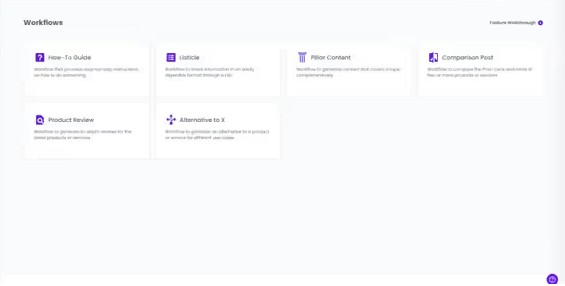
Longshot AI’s big highlight is its Workflows tool. With it, you can make lots of different kinds of content.
- Step-by-step instructions
- Top picks
- Key articles
- This or that? Comparisons
- Checking out products
- Other options to consider
This tool is great because it helps you make content fast in the style you like. It’s also perfect for people who own online shops or do affiliate marketing since they often need to make content like this.
FactGPT
Longshot AI includes a cool feature named FactGPT. It helps make new and interesting content using information from users.
This feature is quite like the ones in Workflows, but it makes content that’s a bit more free and unstructured.
Templates
The Templates section is a handy place packed with text tools for you to use. You’ll find:
- Give directions
- Make text longer
- Change wording
- Create titles
- Plan blogs
- Make FAQs
- Turn keywords into paragraphs
- Turn bullet points into sentences
- Write short web page descriptions
Different AI Than Longshot
Longshot AI is great for starting with AI to make content because it’s not too pricey. But, it doesn’t have all the cool features some other tools do. This happens because those tools cost more.
If you want something better for SEO, you should look at SurferSEO or Frase. They’ve been the top choices for a while. They’re pretty good but will cost you more.
Looking to create AI pictures? Check out Hypotenuse.ai, which is about the same price. Or, if you want something more advanced, go for Midjourney.
Longshot AI Review
Longshot AI is a great choice for people who want to get better at using AI tools.
It’s very affordable, which is perfect for beginners. This platform teaches you the basics of how AI software operates. It’s a good place to start if you’re looking to improve without spending a lot of money. It’s easy to use and has everything you need to begin making things.
Questions You Might Have About Longshot AI
What does Longshot AI do?
Longshot AI uses smart computer programs to automatically create writing or multimedia stuff like articles, blog entries, posts for social media, or scripts for videos from the instructions you give it.
Is Longshot AI free?
Sure, you can start using Longshot AI without paying. This way, you can try out its tools and understand how it functions. But, if you want to keep using it after the trial ends, you need to pick a paid plan. That will let you use all the things Longshot AI has, for as long as you want.
Why use AI to write stuff?
Using AI to write helps save time and work because it makes great content fast. It gives new ideas, makes you more productive, and helps with making things like product descriptions, social media updates, or emails.