
Do you want to check the readability of your writing? Curious about your Flesch-Kincaid score in Word? Looking to find out how readable your writing is in Word on a Mac? This simple guide covers everything you need, beginning with the latest Word version for Windows and Mac: Word for Microsoft 365.
Do you need to make your writing easier to read? Are you curious about your Flesch-Kincaid score in Word? Do you wish to test how readable your Word document is on a Mac? This guide has everything you need. It covers how to get started with the latest Word version for both Windows and Mac computers: Word for Microsoft 365.
Look up how easy it is to read in Microsoft Word for Office 365.
To check how easy it is to read your text in Word for Microsoft 365 (this also works for Word on Mac and Word 2021), follow these steps:
- Open your Word file.
- Click on the “Home” tab.
- Go to “Editor” and then “Document Stats.”
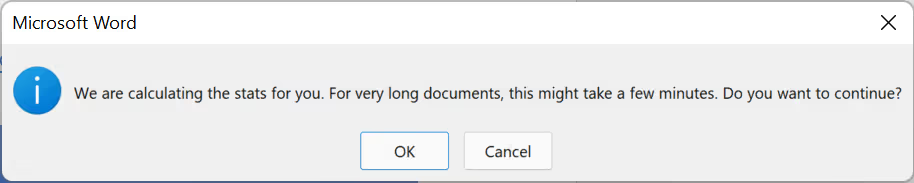
- If your file is big, Word might tell you that checking will take a bit of time.
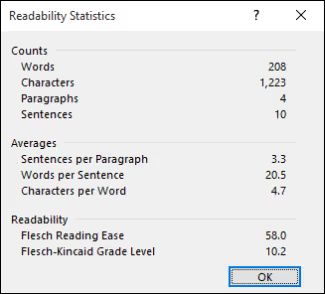
- Once done, Word will show you a window with your readability info.
Make Word Easier to Read in Past Versions
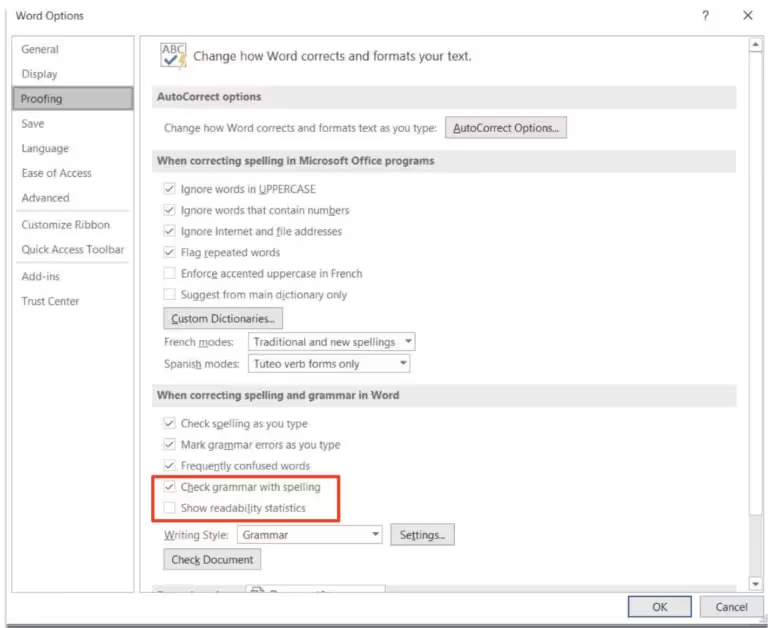
If you’re using Word 2013 or any newer version, up to 2021, you must activate the Readability option to use it. This is how you can do it on Windows:
- Open Word, then click “File” at the top and pick “Options.”
- Look for “Proofing” in the new window that opens.
- Find and tick the options “Check grammar with spelling” and “show readability statistics.”
- Click “OK” to finish.
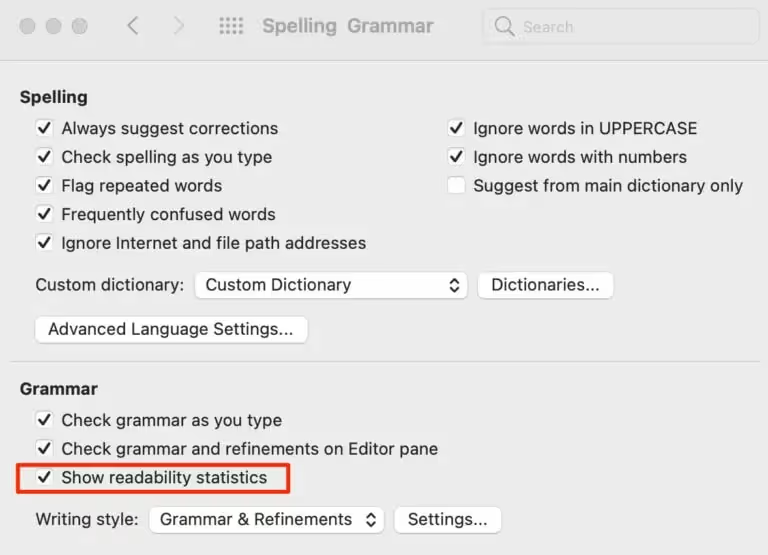
So, this is the way to do it on a Mac:
- Open Word.
- Find and click the Word tab. It’s next to the Apple logo, up on the left.
- Now, click Preferences.
- Here, click Spelling and Grammar.
- Look for Grammar and click the box that says “show readability statistics.”
- Click X. This will close the window.
Use Word to see if it’s easy to read by checking spelling and grammar.
To check how easy your document in Word is to read, you can use the grammar checker. Here’s how:
In Windows, press F7. This starts the check for spelling and grammar. Then, choose “Show Readability Statistics.”
On a Mac, start by clicking “Tools.” Then, pick “Spelling and Grammar” and choose “Editor.” Last, in the insight section on the bottom right, click “Document Stats.”
Understanding Microsoft Word’s Readability Scores
A Simple Guide So, you’ve seen your readability scores in Word, but what do they really tell you? These scores help you understand how easy or hard your document is to read. They show you things like how many words and characters you’ve used, and how many sentences you tend to put in a paragraph or words in a sentence.
But, if you’re curious about how readable your writing truly is, beyond just the basics, there are two more scores you should look at.
- The Flesch Reading Ease score helps us understand how easy it is to read something.
- Flesch Kincaid Grade Level measures how hard or easy it is to read something.
Explaining How Easy It Is to Read Your Writing with Flesch Kincaid Scores
Flesch Kincaid measures how easy it is to read your stuff by looking at how long your sentences are and how many syllables are in each word. After you check your writing in Word, you get a score between 0 and 100.
Simply put, if you get a high score, your writing is easy to read. This guide helps you figure out how readable your writing is based on the score Word gives you.
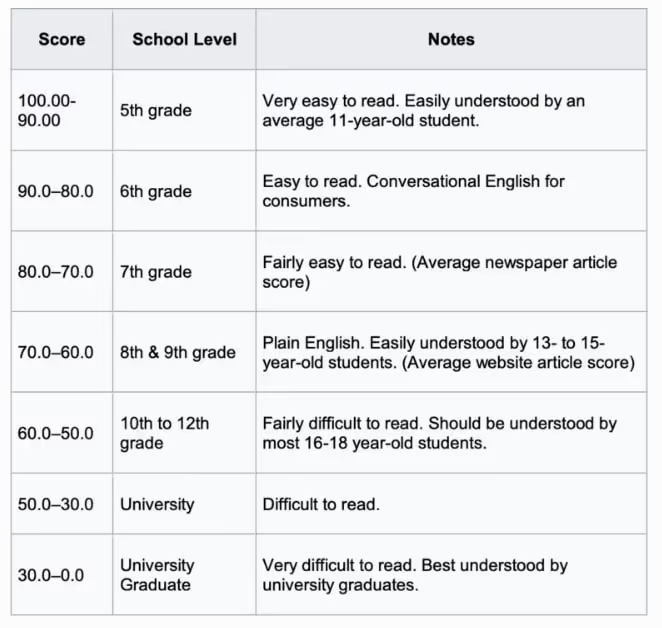
In many places, even if they don’t have the same system, people get what it means when we talk about reading levels like in school. In the US, most people read like they are in the 8th or 9th grade.
Let’s see what this ends up looking like:
When you write in a different language from English
Remember, Word might not show you everything about how easy your text is to read. Sometimes, you won’t get scores to help you know if your writing is easy or hard to understand. Keep this in mind.
Is it Ever Bad to Check How Easy Your Document is to Read in Word?
Sometimes, making sure your document is easy to read in Word isn’t the best idea. This includes times when:
- Writing about very detailed topics
Tools that check how easy it is to read something work well for most writing. But, for writing that’s very detailed or difficult like science papers or legal stuff, these tools might not be right. You should think more about how much your readers know about the topic. Their knowledge and experience are more important than what a readability score says.
- Creative Writing and Books
When you use programs like Microsoft Word to check your writing, they look at how complex your words are, the grammar, and how long your sentences are. But when you’re writing stories or poems, these rules
- Words from different places
It’s good to remember that words can be different in other areas or situations. When you write for people or want your writing to do something special, you might need to choose words that fit well with how people in those places talk.
- Writing for Special Groups
When you write for special groups, like people with unique interests or from different places, you can’t always rely on standard rules about easy reading. If you’re talking about something very specific, it helps more to think about what they already know, their experiences, and the whole situation when you choose how to write.
- When you use different languages or translate words
Remember that AI might not fully get the small, important details in each language. This can make sentences vary, miss the meaning of phrases used in everyday language, and a lot more. All of this might make the readability score not very accurate.
Is It Good to Only Use Flesch-Kincaid Scores?
Flesch-Kincaid is well-known and the only one you’ll find in Microsoft Word right now. But it’s not the only tool around.
There’s another tool called Bypass Engine. It does more than Word can. It’s a free tool that checks how easy your content is to read. It uses many tests, not just Flesch-Kincaid. It gives a complete view of your content’s readability.
- The Gunning Fog Index measures how easy or hard it is to read something. It looks at how long sentences are and if there are big words (words longer than two syllables). A bigger number means it’s harder to read.
- The SMOG Index helps figure out how many years of schooling you need to easily read a text. It looks at how many big words are in a part of the text. People use it a lot to check if health and law papers are easy to read.
- Powers Sumner-Kearl – A way to see how easy it is to read something by checking the kind of syllables and how often words are used.
- FORCAST Grade Level checks how easy it is to read something by looking at how often it uses short, simple words.
- The Coleman Liau Index helps figure out what grade in school you need to be in to understand a text. It looks at how many letters are in each word and how many sentences are in 100 words. Unlike other ways of measuring, it doesn’t count syllables. This makes it a super fast and handy method.
- The Automated Readability Index is a way to figure out how easy or hard something is to read. It looks at how many letters are in each word and how many words are in each sentence. Then, it turns those numbers into a grade level, like what you see in school in the U.S.
- The Dale-Chall Readability Score checks how hard your writing is to read. It looks at how long your sentences are and if you use too many hard words that aren’t in a list of 3,000 easy words.
- The Spache Readability Grade helps us understand how easy a book is to read for kids. It looks at how long sentences are and if there are hard words in it. This way, it figures out if children from first to third grade (about 6 to 10 years old) can easily read the text.
- The Linsear Write Grade checks how easy it is to read something. It looks at 100 words at a time to see how many of those words are simple and how many are a bit harder to understand.
Use BypassEngine’s Easy Readability Test
Check how easy your content is to read and how many keywords it has with BypassEngine’s test. Also, see how well your content does using many different readability tests with a Bypass Engine scan. You can also find out if your content is original or if someone else has written something similar.
Making your content better can help it show up higher in Google searches.