
Hemingway Editor is a key tool for writers who want to make their writing short and catchy. Now, there’s a new version called Hemingway Editor Plus. This new tool uses AI to help make writing clearer.
People often talk about AI, but does the AI in Hemingway Editor Plus really help make writing clearer? Let’s take a closer look to see how it does its job and if it’s better than old-school editing.
It doesn’t matter if you’ve been writing for years or are just starting. It’s good to know how Hemingway Editor Plus works. Finding out if its AI features are worth the extra cost can change how you write.
What is Hemingway Editor Plus?
Hemingway Editor Plus is a better and smarter version of the well-liked Hemingway Editor. This tool points out mistakes and spots that can be better. Now, with its AI help, it aims to give quick fixes and tips for easier editing.
Hemingway Editor Plus and the Free Hemingway Version Comparison
The Hemingway Editor for free spots lots of grammar mistakes, like using passive voice too much. But in the free one, you can’t save work right from the web or change it to other formats.
Hemingway Editor Plus is $100 a year, or $8.33 a month. This better version uses AI to help make writing clearer and more to the point. It uses credits to fix sentences, and you get 5,000 credits with your plan.
More than just showing what’s wrong, Hemingway Editor Plus also fixes it right away. It makes complicated sentences simple and changes passive voice to active. And it tries to keep the writer’s own style while doing this.
How Hemingway Editor Makes Sentences
Simple Hemingway Editor helps by coloring sentences. It uses different colors to show how complex a sentence is.
- Yellow means the sentence is tough to understand
- Red means the sentence is super tough to understand
- Purple means some words or phrases can be simpler
The editor gives us a score to show how easy or hard it is to read something. The Hemingway Editor does this by checking what grade level in the U.S. someone needs to be at to understand the text.
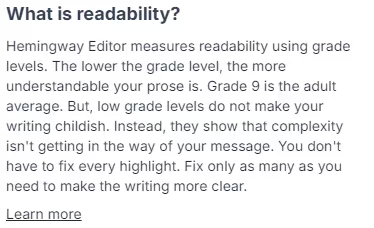
The app probably thinks longer sentences are harder to understand. It also points out big words and offers simpler ones instead.
Checking How Easy It Is to Read This Article
We tried out the tool for free for two weeks to see how good Hemingway Editor Plus is at making writing easier to understand.
At the beginning, we put a piece of this article into the editor to check how easy it is to read.
The Hemingway Editor Plus looked over everything broadly and suggested changes to make some parts clearer.
Then, we decided to test the AI features.
Hemingway’s AI Rewrite Tricks
When you begin, you’ll see Hemingway’s AI has a cool feature. It shows red and yellow lines under sentences that are too long. If you click on these lines and then select “Fix it for me,” the AI offers a new way to say it.
If you want, you can ask the AI for a different suggestion too.
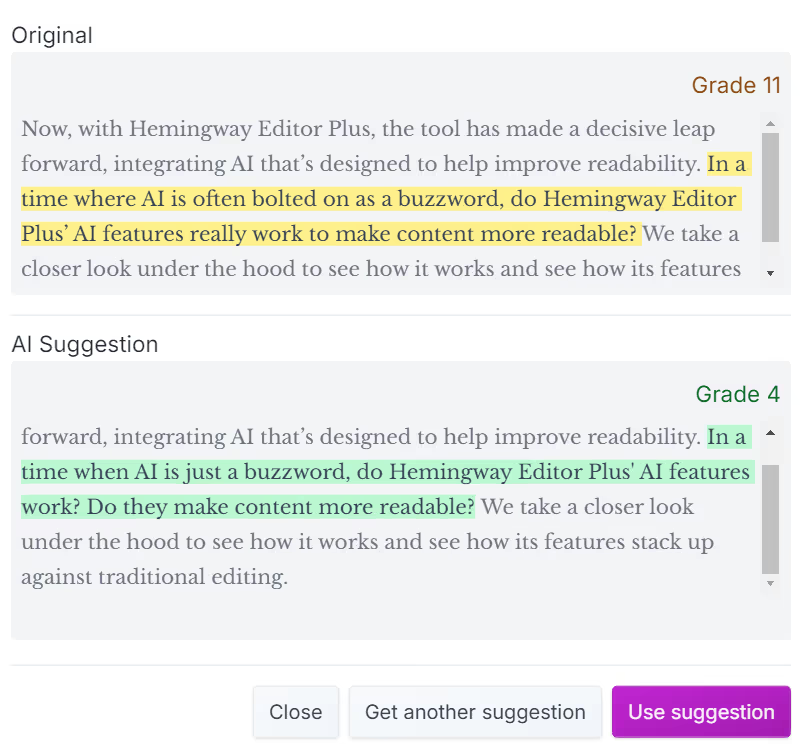
In the example before, the tool changed “is often bolted on as a buzzword” to simply “is just a buzzword.”
It also made a long sentence shorter by splitting it into two. Can these changes really take a text from being okay for 11th graders to right for 4th graders?
Sometimes, the editor’s AI makes choices that might make us wonder. It did make the text easier to read by changing a few words. But then it said it made the text much easier to read – like going from 12th grade level to 6th grade level.
Sample :
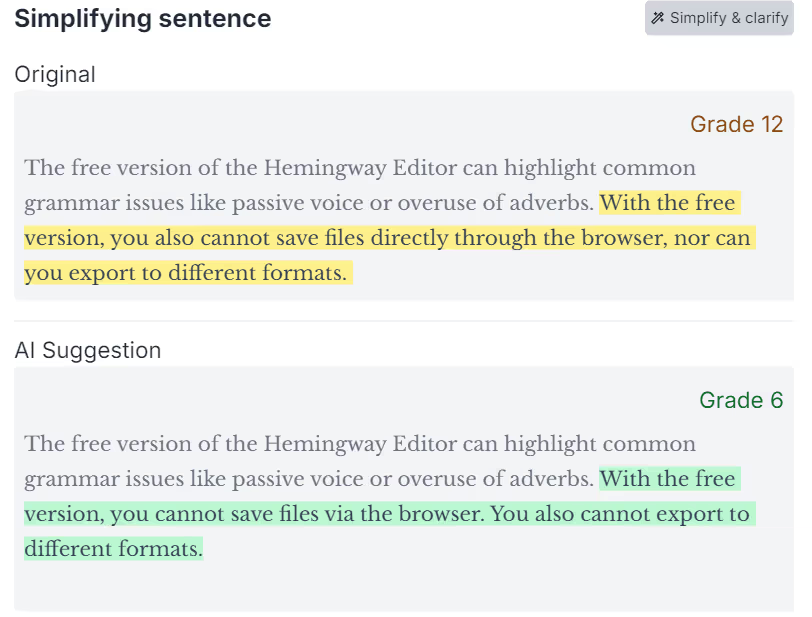
The writing sounds more like a robot and not interesting. It feels more like a list of steps than a review.
Then, we looked at its other AI features. What about how it uses passive voice?
Can Hemingway’s AI Spot Passive Voice Well?
I changed a sentence in the article on purpose to have passive voice:
Funny thing, the Hemingway Editor Plus missed spotting passive voice. However, I saw a blue line under it because of Grammarly working in my browser.
Actually, when there was another passive voice, it got a blue highlight. The tool even suggested fixing it for me. Since the AI usually marks things in green, it’s a bit confusing whether the regular checker or the AI found this mistake.
When we use AI to catch passive voice mistakes, it should mark them green. But, it marks them blue instead. So, we’re not sure if the AI or the basic Hemingway Editor caught them.
Can Hemingway’s AI Improve Sentences and Keep Them Natural?
What’s the bottom line here? Nope, not quite.
Hemingway’s AI “fixes” help make writing shorter and simpler. But, it also makes it sound like a robot wrote it. It cares more about how long and complex sentences are than making things for real people to read. It’s like a good blog post now sounds like something a kid in fourth grade wrote for their homework.
The same thing happens with Hemingway Editor Plus and its AI for fixing paragraphs. Remember, you don’t have to go with what it first suggests. Hemingway Editor Plus offers different choices if you’re not happy with the AI’s first idea.
Is Hemingway’s Way of Checking Readability Right or Not?
Hemingway thinks the grade level of writing tells us if it’s easy or hard to read. But this is just one way to check. Are other ways to check readability better because they give us more options?
On the other hand, a tool called Originality.ai checks how easy to read something is using many popular ways of checking readability.
- Reading Ease Test
- Grade Level Test
- Foggy Words Test
- SMOG Test
- Powers Test
- FORCAST Test
- Coleman Test
- Automated Readability Test
- Dale-Chall Test
- Spache Test
- Linear Write Test
Go to the ‘Metrics’ tab to see the scores on the Originality.ai Readability Checker.
Instead of just using one score to see if people can understand your writing, using several different scores can show you a clearer picture of how easy or hard your text is to read.
Also, if you know how each score is figured out and who it’s meant for, you can make your writing better fit your readers, not just aim for a general grade level.
But, making your sentences simpler does make them easier to read, it can also take away their special style and flow, making your writing feel choppy.
When you read sentences one after another, all written in the same short way, it gets boring and hard to follow.
Will Hemingway AI Make My Work Look Like It’s AI-Written?
If you click on things that Hemingway AI tells you to fix and let it make changes, you should know there’s a big “but” here.
After Hemingway Editor Plus made our sentences simpler, we checked some of that writing with an AI Detector.
If you use the Hemingway Editor to improve your writing, it might make it seem more like a computer wrote it.
The AI Detector was pretty sure our writing was done by a computer, and it was 100% certain about it.
Hemingway Helps You Write Clearly
Hemingway is good at finding things that make your writing hard to read. Long sentences, passive voice, and too many adverbs can make your writing messy.
If you want to write in a simple and clear way, maybe even a bit technical, for more people to understand, Hemingway’s AI and scores can help you see how simple your writing is.
But, remember, no tool is perfect. Hemingway likes things really simple, so sometimes, it might take away the deeper meaning or detail from your writing.
For example, if you’re writing for data scientists or explaining complex things, you might need to use big words or long sentences to make everything clear. But, using the Hemingway app might make your writing too simple.
Then, when you use the Hemingway app for creative writing, it might take away some of your style and personal touch. It’s best to use a tool like this to help with editing.
Only you know your audience well, and simpler isn’t always the best approach. While the Hemingway Editor Plus is a good place to start for making your writing easier to read, you should use it along with other editing tools. It shouldn’t be the only way you decide if your writing is good.