
Let’s face it: grammar is basically everywhere. I mean, if you’ve typed that much of a sentence on your computer in the past few years, chances are the little green “G” has been staring at you, wanting to change the comma or suggest a nicer word. Sure, it’s convenient—who doesn’t want their typos magically corrected? – and honestly, the idea that this would save me from another “you vs. you” disaster? bless

But as much as Grammarly likes to flaunt its flashy stats (thirty million daily users—wow!) and promises of perfect writing, there’s a lot going on beneath the surface. Over time, more and more writers and language lovers started asking uncomfortable questions. Could it be that we are losing something by letting an algorithm take over our sentences? Are we trading privacy for convenience? What about all those subtle nuances and personal touches that make our writing our own?
The Stifling of Natural Voice and Creative Style
One of the biggest complaints about Grammarly is that it tries to flatten your entire writing personality. Sure, it’s great if you want to make every sentence sound like something a robot would say at a board meeting, but what happens to all the little quirks that make your voice your voice? Have you ever come up with a one word sentence for a drama? Grammar hates it. Want to get creative and throw around slang or bend the rules a little like poets do? Be prepared for an angry red underline.
In fact, after a while you start to notice that everything you write sounds awfully similar—like it’s been passed through the same corporate filter over and over again. Ironically, writing isn’t just about getting all the commas in the right place; it’s about telling a story or making someone feel. That’s hard to do when all the quirks are removed in the name of “clarity”. If I wanted 100% smooth, safe sentences, I’d ask for a guide, not advice on how to write like a human.
Alarming Data Privacy and Security Risks
This is a real headache for anyone working in cyber security. Grammarly needs broad access to everything you type, whether in browser plugins, desktop tools or mobile apps, almost every word you type is sent to their servers to be checked for errors.

Think what this means for sensitive work. Maybe you’re drafting an important legal agreement, dealing with company secrets, or sharing patient files. Either way, with Grammarly running, your words go straight to the cloud, beyond your local device. The company claims to adhere to strict security standards, but in 2018 there was a security scare when an attacker was able to grab people’s private texts and files. It was a wake-up call: there’s always a risk when a text leaves your device.
For people or teams dealing with things like HIPAA, GDPR, or blocked NDAs, this isn’t just a technical issue—it can be a direct compliance issue. With Grammarly, you can easily violate regulations regarding personal privacy or confidential data and create a huge opening for leaks or fines. For many companies operating in those areas, it simply cannot be used.
The Crutch That Prevents Genuine Learning
You are absolutely right. Grammarly’s convenience can pay off in the long run. Instead of pausing to figure out why a sentence is awkward or the tense of a verb is awkward, people just hit the “fix” button and move on. There’s no moment to ask, “Um, why is this wrong?” or “How can I make it better myself? It’s like always checking your spelling and never learning to ‘accommodate’ your spelling.”
If you rely too much on these automatic corrections, your brain will stop looking for patterns or thinking about structure. The red and blue lines show the changes, but you never remember the actual rule. Once the tool is gone—say, writing notes to someone or writing on a whiteboard—there’s no point in learning the shortcuts.
Writing a thank-you note by hand or answering an old-school written exam question suddenly becomes much more difficult. You hesitate, second-guess yourself, maybe even feel lost. The convenience of direct computer feedback has replaced real understanding. You haven’t really learned language skills at that point; you just learned to wait for the next offer.
Contextual Inaccuracy and Blind Rule-Following
You hit the nail on the head. Tools like Grammarly try to juggle the language, but often fall short of the very details that make words interesting. When it comes to complex subjects—think medicine, law, engineering—the tool tends to replace the exact words with things that just don’t fit. Suddenly, a properly used technical term becomes awkward or even completely incorrect.
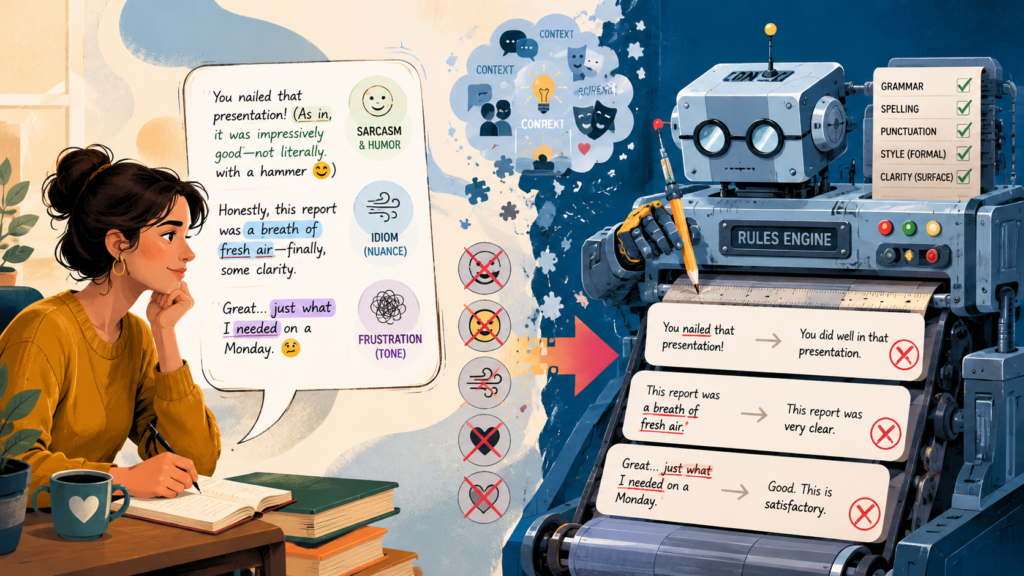
Then there’s the problem of jokes, spying, or anything that isn’t clear. Say you’re dropping the sarcasm—you might be writing, “Just what I needed, more documentation! The system can highlight that and offer a softer tone, asking you to rewrite a joke that wasn’t really nice. It’s like a robot at the dinner table that explains every pun and skips all the notes.”
After all, these checkers handle simple sentences in emails properly. in letters or schoolwork, but when it comes to style, jargon or subtlety, they tend to level things out. You lose the flavor and quirks that give writing its personality. Language is not always clean; that’s half the fun. But grammar bots see the world in ones and zeros, and many just fall through the cracks.
The Questionable Accuracy of the Plagiarism Checker
The paid version of Grammarly does offer a plagiarism checker, but if you’re working on university-level essays or research papers, it can sometimes cause more stress than peace of mind. Unlike Turnitin—which is what most colleges actually use—Grammarly doesn’t use large internal databases of student work, journal articles, or things that are beyond paywalls. Instead, it mostly scans what is publicly available online and in some databases like ProQuest. So his reach is much thinner than that of professors or university plagiarism checkers.
This gap can create a false sense of security. Imagine a student runs an assignment through Grammar, gets the “all clear” and thinks everything is fine – while they may have missed some bits of journal articles, books, or a classmate’s old essay that Grammar just can’t find. There’s also the headache of “false positives”: Grammarly can flag direct quotations that contain correctly cited references, common phrases from textbooks, or even simple definitions, making it look like you took shortcuts when you didn’t.
All of this makes things more difficult for students, especially when deadlines are hanging over their heads. Instead of feeling calm, you may find yourself second-guessing your work right before you submit it. You can waste time frantically rewriting innocuous parts or stressing over fake problems. Worse, if Grammarly misses something, you’re still at real risk of running afoul of your school’s plagiarism checker—and you probably won’t know until it’s too late.
The Aggressive Upselling and Freemium Trap
The free version of Grammarly feels like getting a sample at the grocery store—just enough to whet your appetite, but not nearly enough to eat. Of course, it will catch on if you write “definitely” as “definitely” and there will be grumbling about your classic / their / their failures. But when it comes to the deeper stuff? Want to make your tone friendlier or your sentences less awkward? Suddenly everything is locked tighter than grandma’s cookie jar.
And the reminders – oh man, the reminders. Like every other word I see is “advanced issue” or a little popup that directs me to the premium button. You click out of curiosity, thinking maybe they’ll throw you a bone, but mostly it’s just Grammarly sighing, “Well, you could fix that… if you subscribed.” Meanwhile, there are other free tools that quietly do just as much, sometimes even more.
Honestly, between the constant updates and the stalking emails in my inbox. email parade (“Unleash your potential today!”) using Grammarly’s free plan can start to feel less like you’re getting help and more like you’re trapped in a never-ending sales pitch. Just hit Ignore and move on.
A Negative Impact on ESL (English as a Second Language) Learners
Let’s talk for a moment about Grammarly, not the marketing version, but how it actually works when it comes to helping people who are learning English. Of course, it’s everywhere these days and has that shiny, instant-fix appeal. But if you’ve ever used it to try to improve your English skills, you might have noticed something amiss. Rather than a language teacher, Grammarly acts as an answer key, giving you the final result without explaining how to get there. It will say, “Change this,” but never, “That’s why your sentence sounds weird” or “That’s a grammar rule you missed.” So basically yes, it gives you a fix, but not the tools to fix it yourself next time.
Here’s why it’s a problem: learning a language requires understanding patterns, understanding subtle changes in context, and sensing tone and nuance. When Grammarly works its magic, it can arrange your sentence to make it look nice. But in the background? You didn’t realize what mistake you made – was it word order? Wrong preposition? Mixing up the times again? Who knows! Just hit accept and move on.
And sometimes everything is even stranger. Grammarly will make its suggestion and suddenly your slightly awkward (but totally understandable) sentence will turn into something that sounds good… except now it doesn’t actually make sense! I’ve seen cases where the meaning gets muddled or feels stiff and unnatural, a phrase no real person would use. If you’re still shaking your English, you probably won’t even notice; you can trust those fixes just because they seem right.
In the end, this can get the learners stuck. Instead of gaining confidence and actually learning English step by step, they may just start relying on automated feedback as a crutch. The result? The sentences look great on paper, but there’s still confusion underneath. It’s like putting a new coat of paint on cracked walls: sure, it looks better at first glance, but none of the real problems go away. And isn’t the point of learning a language to learn it, not just to look good?
Compatibility and Resource-Heavy Performance
Have you ever tried to quickly send an email? email or edit an article to stop the entire browser? Welcome to the Grammarly roller coaster. Honestly, for something that’s supposed to make life easier, Grammarly might be a bit of a godsend. It eats up your computer memory like an unlimited buffet, especially if you use a browser extension on Google Docs or WordPress or pretty much anything with text.

There’s nothing like typing text and seeing your words appear on the screen three seconds after you hit the keys. That “spinning green icon of death” (if you’ve seen it, you know exactly what I mean) is enough to make anyone want to throw their laptop across the room. And let’s not even talk about what happens to interesting document layouts or embedded Excel sheets – your careful formatting turns into an absolute train wreck. More than once, I’ve found myself simply turning off Grammarly entirely to actually get work done. Maybe one day they’ll fix it, but until then, get ready for some good old lag!
Promotion of Americanized, Monolithic English
It’s honestly frustrating at times. Imagine being a British writer, painstakingly crafting your copy for a UK audience, only to have Grammarly step in and insist, “No, it’s colour, not colour” or “Center, not centre”. It’s relentless! Even when you’ve triple-checked your settings or selected British English, Grammarly insists on following US rules.
And don’t even get me started on collective nouns – in the UK we happily say ‘team ready’ but Grammarly wants to slap you on the wrist and change it to ‘team ready’. Why? Because apparently everything has to sound like it was written by an American news anchor.
If you run a business that needs to sound authentically local, this can be more than just annoying. Your brand voice starts to slip – suddenly your website copy looks like it fell out of New York instead of Newcastle. I’ve seen people waste years struggling with their revisions, going back and forth, or completely ignoring half of Grammarly’s suggestions.
Conclusion
Grammar certainly has its place, but let’s not pretend it’s some kind of miracle worker for writers. Think of it more like that friend who catches lettuce stuck in her teeth before going into an interview—very helpful, especially when you’re tired of reading your words and the typos start to blur together. But is this the secret sauce to great writing? Not even close.
The trick is knowing when to reach for it. If you’re an early-stage, deep-dive into the messy art of scribbles, do yourself a favor: leave Grammarly turned off. This is a sanctuary for your voice and ideas, not algorithmic grammar suggestions. And really, don’t even think about using it with sensitive information on the line. It’s just not worth the risk.
The most important thing? Never take his advice as gospel. Her suggestions are fine as a second opinion, but you have to look at each suggested improvement and ask yourself if it actually makes your writing better (or just more boring).
After all, Grammarly is a tool—a pretty good one—for catching sneaky typos in emails. in letters or blog posts where perfect but generic writing is perfectly fine. But if you want to write stuff that feels real, that sounds like you, you still have to put in the work and learn the craft yourself. Use grammar like you would a calculator: check your work when you’re done, but don’t throw out your good old-fashioned brains. The goal is not perfect, lifeless English; only a human can write it.