
Need a free Chrome add-on that helps you write amazing content in Google Docs? Check out Compose AI. It’s designed to work alongside you, making your writing engaging and top-notch.

Looking to spruce up your writing on Google Docs and make it more enjoyable? Give Compose AI a shot! This free tool can be added directly to Chrome, making the creation of awesome content as simple as pie.
Now you might wonder, ‘Can this complimentary accessory for Google Chrome truly provide all the assistance I need for my writing tasks?’ Or is it just another aimless gadget that gets lost in the heap? Let’s find out!
We’re going to explore this:
- Compose AI and what it’s really good for
- How you can use this tool
- The kinds of things you can make
- What you’ll need to pay for it
- We’ll look into the main features
- Good stuff and the not-so-good stuff
- Other options besides Compose AI
- If its content is caught by checking tools like BypassEngine
- Our final thoughts on Compose AI
Fast Compose AI Overview
- Easy to use – 9 out of 10
- The things it can do – 7 out of 10
- Help from the company – 7 out of 10
- Cost – 9 out of 10
- How fast it is – 9 out of 10
- You can tell it’s ai by BypassEngine
Summary – 8/10
Compose AI is a great tool for writing simple emails and coming up with ideas to make your writing better. It’s easy to use and has an AI feature that helps you write faster without stopping. This is great for making things like product descriptions, social media posts, or articles.
Just to make it even sweeter, this handy-dandy tool is always free. What does that mean for you? Well, it simply means you can continuously use it to boost your writing without ever digging into your pockets! Perfect solution if the budget’s a bit tight, right?
Who should use Compose AI?
You know that feeling, right? When you’re drawing a blank and can’t seem to put pen to paper–or fingers to keyboard in our modern world. Well, Compose AI has your back!
Now imagine this. You’re running a sparkling new business on a shoestring budget with no expanse for major marketing campaigns. No worries though because Compose AI is like the swiss knife of content creation – handy and reliable. It helps you construct those clear-as-crystal inspiring ideas, whip up compelling phrases and even add a spurt of professionalism to your business appearance. Cool, don’t ya think?
How to Make Compose AI Work Well
To use the tool well, you need to understand how Compose AI operates.
For instance, just adding the Chrome extension doesn’t mean it will start working in Google Docs right away.
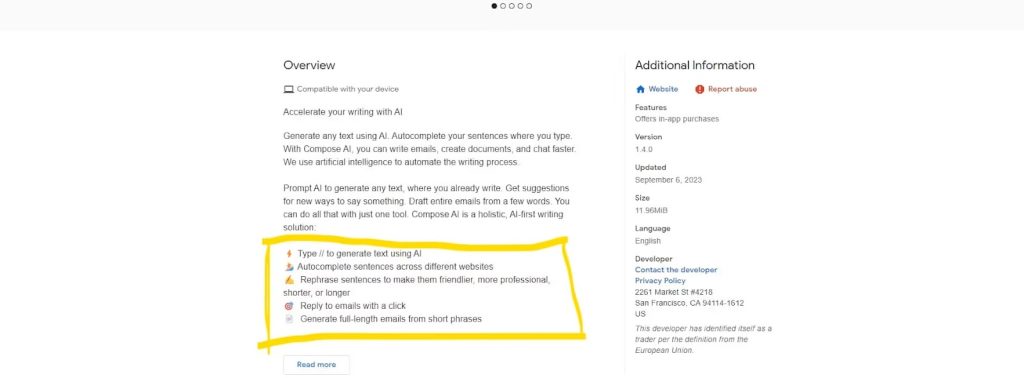
When you get Compose AI, make sure to look at the guide. It teaches you how to use Compose AI well.
For example, to get tips and made-up content in Google Docs, you should type “//” first.
What Can Compose AI Make?
Did you know? Compose AI is quite the toolbox for marketing. It’s like your powerful sidekick, ready to help generate content for blog posts, social media updates, product descriptions, and even email responses.
As you grow more familiar with it and start exploring its capabilities – well, hold on tight! You’ll uncover a whole range of cool features. All it takes is knowing how to ask the right questions – think of it as finding the ‘magic words’.
What’s the Price?
One major benefit of Compose AI is it’s totally free! You don’t have to pay to start using a new service. Compose AI works as an addition for Google Chrome, which you can get and use without spending any money.
Main Features of Compose AI
Outline generator
One cool thing Compose AI can do is make an outline for you. This helps a lot when you need to write about something but don’t know how to start.
Let’s say your business is about selling energy drinks. You decide you want to explain why choosing an all-natural energy drink is a good idea.
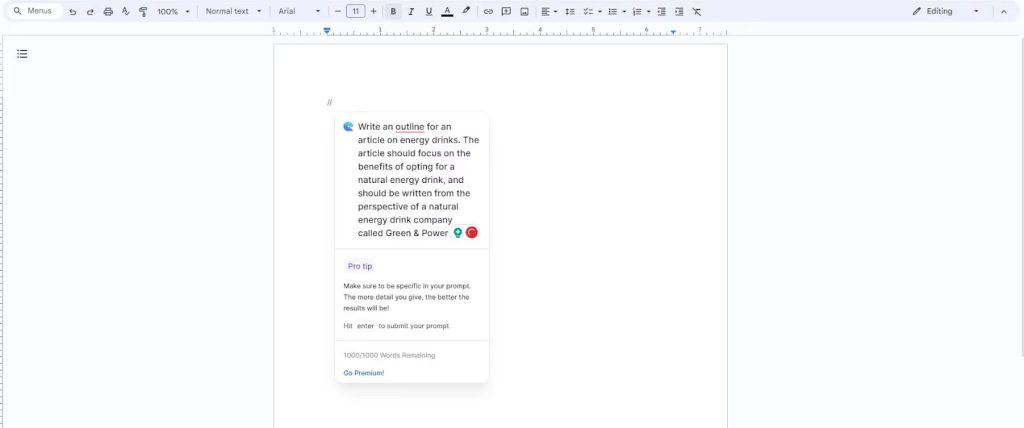
With the outline tool, we can make a full guide to help us write.
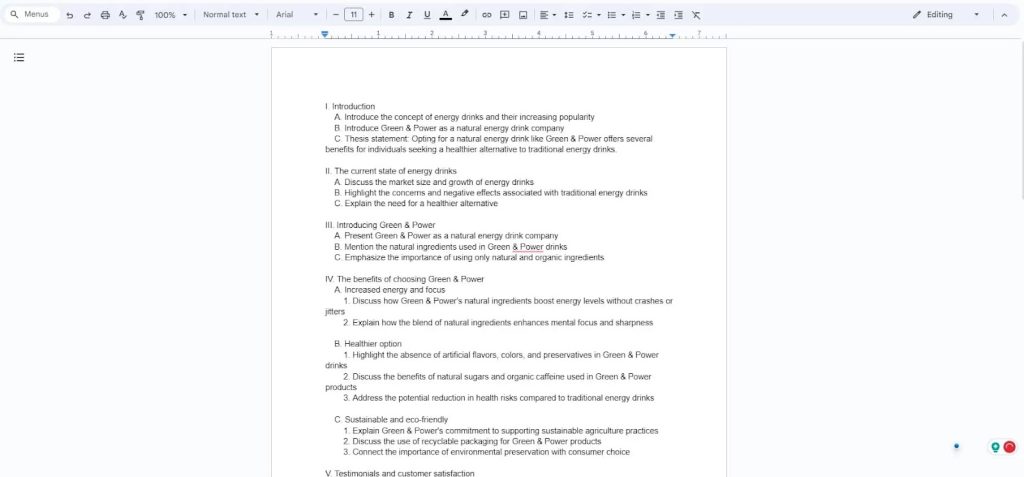
This can save a lot of time and let you put all your effort into writing the content.
Headline generator
You see in the example above, a big problem stands out. Our blog post doesn’t have a title! But don’t stress. Compose AI didn’t overlook this. They use another tool to make headlines.
Like the outline tool, the headline maker helps us think of an idea fast, so we can begin writing the main text.
Paragraph writer
There are moments when we’re all set to let our creativity flow, but it feels like our brains just refuse to play ball. We struggle to string together a single decent sentence and get stuck. No worries! Compose AI is your superhero in such situations – making it easy for you to craft paragraphs effortlessly.
Take this example; we talked about energy drinks, and guess what? It was breezy! The whole thing quickly found its way straight into Google Docs without any hiccups.
Writing AI Options

Everyone’s talking about AI-generated text these days. Giants and startups alike are shelling out some serious dough just to be the number one search result for AI content on Google Chrome. Looking for alternatives such as Compose AI?
No sweat! All you have to do is stroll down to the bottom of the Google Chrome web store page. A whole bunch of other plugins are waiting there for you. Have fun exploring!
Can BypassEngine Spot Compose AI’s Work?
You’re curious, huh? Want to know if BypassEngine has got what it takes to identify whether a piece of content is the handiwork of an AI? And your question gets even more fascinating considering that Compose AI operates as a Google Chrome extension rather than its own standalone product.
How about we give it a whirl and see for ourselves? We had penned down something earlier on natural energy drinks. Wouldn’t hurt to analyze that using BypassEngine, right?
Here’s the interesting part: It doesn’t matter where you sourced your content from; if it was crafted by AI – yes, you guessed right – our friend here at BypassEngine will sniff it out! Quite handy information I must say!
The Final Call on Compose AI
So, you’re probably wondering, does Compose AI deliver what it teases? – Helping to automate your writing process. Well, that’s a yes… and a no.
This tool certainly packs a punch with its capabilities plus the user experience is top-notch too. But according to Bypass Engine’s report, there’s just something missing – that human touch filled with emotion and authentic flow typically seen in high-quality human-written content.
But hey, don’t write off Compose.ai so quickly! If you find yourself stumped for ideas or need help condensing complex information swiftly, this tool comes as an absolute lifesaver. Plus point – it works neatly within Google Docs which saves even more time.
To wrap up here – Used correctly and smartly together with respecting its limitations —Compose AI definitely could turn into a nifty addition to your toolkit. And why not give it whirl anyway when you don’t have anything to lose? After all —it’s free!
Easy Questions About Compose AI
Is Compose AI safe and easy to use?
Absolutely! Compose AI is a handy tool that’s safe and super simple to use. It focuses on making your writing even better. All you need to do is add it to Chrome, and it works like magic – helping you tweak and polish your writing effortlessly in just a few steps!
Does it cost anything to use Compose AI?
Compose AI is a free-to-use tool that you can download from the Google Chrome web store. It’s super handy for writing emails, articles, or any other text work – it saves you time and makes your job easier!
How is Compose AI different from ChatGPT?
ChatGPT helps you write articles on its own platform, but Compose AI is different. It’s an AI tool for Google Docs that improves your writing right there. It learns your style and suggests words to complete your sentences, making writing easier without leaving your document.